Loading...
Searching...
No Matches
ReUseX
ReUseX
⚠️ Warning: This project is in active development and will regularly be introducing breaking changes
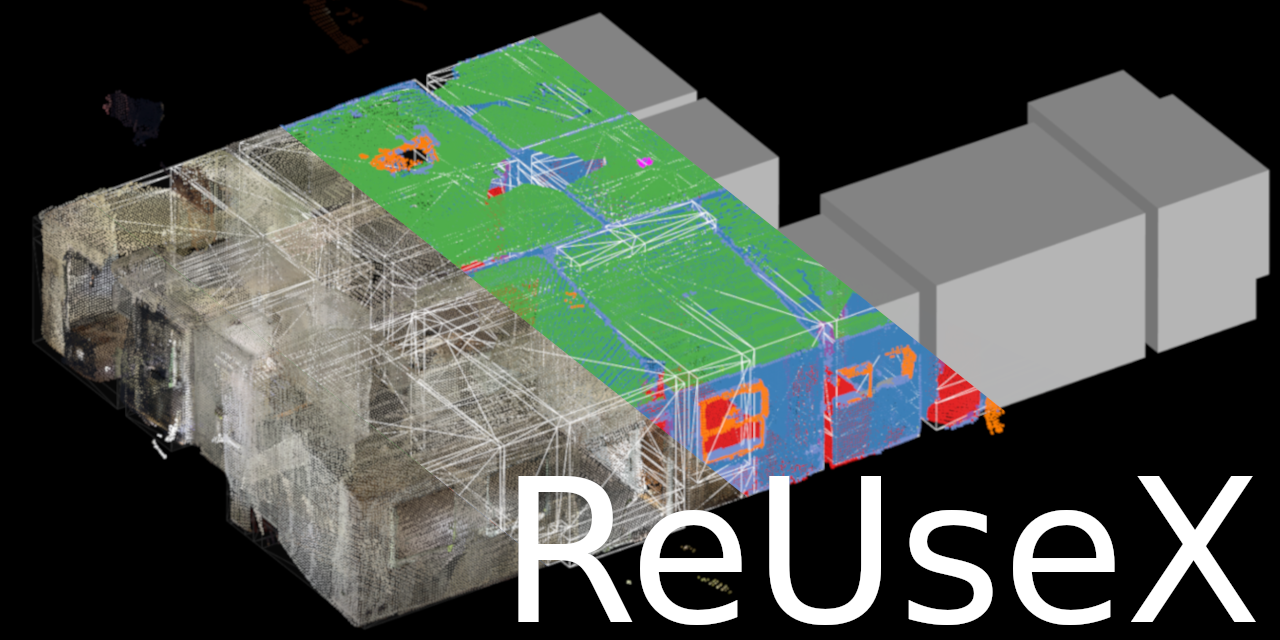
ReUseX is a comprehensive tool for processing 3D point cloud scans of building interiors, designed to support building reuse and renovation projects. The project processes LiDAR scans to create semantic 3D models with advanced segmentation capabilities for architectural elements.
Features
- Point Cloud Processing: Import sensor frames from RTABMap SLAM databases, MuSHRoom and ARKitScenes captures, E57/PLY clouds, 360° panoramas and survey photos
- Pose Refinement: Plane-landmark pose-graph optimization with optional wide-baseline loop closure, joint pairwise registration (GTSAM), and content-based 360° panorama alignment
- Planar Segmentation: Extract and segment planar surfaces (walls, floors, ceilings) via noise-adaptive region growing
- Room Segmentation: Automatically partition point clouds into individual rooms with Leiden community detection over the plane graph (igraph)
- Semantic Segmentation: Deep learning-based identification of architectural elements using YOLO and SAM3 models
- 3D Reconstruction: Cell complex representations solidified into simplified 3D surface models via a MIP solve (HiGHS on CPU, cuOpt on GPU)
- Mesh Generation: Generate textured 3D meshes from segmented point clouds; dense MVS clouds via OpenMVS
- Multiple I/O Formats: E57, PLY, OpenNURBS (.3dm), COLMAP, Speckle, CSV, MaterialEPAS
- GPU Acceleration: CUDA-accelerated processing with TensorRT / LibTorch / ONNX Runtime for neural network inference
Architecture
The project consists of:
- ReUseX library (libs/reusex/): one CMake target per module (reusex_core, reusex_segmentation, reusex_reconstruction, reusex_slam, reusex_io, reusex_vision, …) with a link-enforced layer graph
- rux CLI (apps/rux/): command-line interface with subcommands for the whole pipeline, plus a native Qt client (apps/rux/qt)
The HTTP service worker (ruxd) and the web GUI frontend live in their own repos — ruxd and rux-frontend — and build against this repo's installed CMake package (find_package(ReUseX CONFIG REQUIRED); see "Using ReUseX as a library" below).
For details see ARCHITECTURE.md, the engineering standards in docs/STANDARDS.md, and the pipeline-stage data contracts in docs/CONTRACTS.md.
Getting Started
Prerequisites
- Nix with Flakes (recommended): For reproducible builds with all dependencies
- CUDA-capable GPU (optional): For GPU-accelerated deep learning inference
- C++20 compatible compiler: GCC 10+ or Clang 12+
- CMake 3.17+
This project uses Nix flakes for reproducible dependency management. Install Nix with flakes enabled for the easiest setup.
Development Shell
Launch a development environment with all dependencies:
nix develop
Build Instructions
Using Nix (Recommended)
git clone https://github.com/pfmephisto/ReUseX
cd ReUseX
nix build
Using CMake
cmake -B build -DCMAKE_BUILD_TYPE=Release
cmake --build build
Build Options:
- -DWITH_CUDA=ON/OFF - CUDA / NVIDIA GPU support; also gates the TensorRT backend and the cuOpt solver (default: ON)
- -DBUILD_TESTS=ON/OFF - Enable/disable unit tests (default: ON)
- -DBUILD_DOCUMENTATION=ON/OFF - Enable/disable documentation generation (default: ON)
- -DBUILD_PYTHON_BINDINGS=ON/OFF - Build the pybind11 Python bindings (default: ON)
- -DGUI_ENABLED=ON/OFF - Enable/disable CGAL Qt6 GUI features (default: OFF)
- -DUSE_CCACHE=ON/OFF - Use ccache when available (default: ON)
- -DENABLE_COVERAGE=ON/OFF - Code coverage instrumentation (default: OFF)
- -DML_BACKENDS=AUTO|NONE|<list> - Which ML backends to enable, e.g. -DML_BACKENDS="TensorRT;LibTorch" (default: AUTO)
- -DREUSEX_PACKAGE_TEST=ON/OFF - Register the installed-package consumer ctest (default: ON; see Using ReUseX as a library)
Note on Visualization: rux links PCL visualization unconditionally — it is not an optional build. The reusex_visualize library module is a separate concern: it is built whenever libs/reusex/src/visualize/ has sources. Use -DGUI_ENABLED=OFF (the default) to skip CGAL's Qt6 GUI components.
Building API Documentation
Generate comprehensive API documentation with Doxygen:
# Configure the build with documentation enabled (default)
cmake -B build -DBUILD_DOCUMENTATION=ON
# Generate the documentation (target is named `docs`)
cmake --build build --target docs
# View the documentation
xdg-open docs/api/html/index.html # Linux
open docs/api/html/index.html # macOS
Requirements: Doxygen and optionally Graphviz (for diagrams)
The documentation will be generated in docs/api/, covering:
- Complete API reference for all C++ classes and functions
- Module and namespace organization
- Class hierarchies and collaboration diagrams
- Source code browsing
Running Tests
See docs/guides/TESTING.md and tests/README.md for detailed testing documentation.
Quick start:
# Build and run C++ tests
cmake -B build -DBUILD_TESTS=ON
cmake --build build
cd build && ctest --output-on-failure
The suite (Catch2 v3) is organized as tests/unit/<module>/, tests/integration/, tests/benchmarks/, with shared helpers in tests/support/ and data in tests/fixtures/.
Usage
Command-Line Interface
The rux executable provides several subcommands for a complete point cloud processing pipeline:
All commands operate on a single .rux project database, selected with the global -p/--project flag (default ./project.rux).
# Show version, license and help
rux --version
rux --license
rux --help
# Verbosity control (use -v, -vv, or -vvv for increasing detail)
rux -vv <subcommand>
# Import scan data from various sources
rux import rtabmap <path> # RTABMap SLAM database
rux import mushroom <path> # MuSHRoom RGB-D benchmark capture
rux import arkitscenes <path> # ARKitScenes iPad-LiDAR RGB-D capture
rux import e57|ply <path> # Point cloud files
rux import 360 <path> # 360° panoramic images
rux import photos <path> # Manual survey photos
rux import csv|materialepas <path> # Element / material passport data
# Refine the stored per-frame sensor poses
rux optimize # Plane-landmark pose graph
rux optimize --loop-closure # ...plus wide-baseline loop edges
rux register # Joint pairwise registration
rux align 360 # Content-based 360 panorama alignment
# Create derived data products (all creation operations)
rux create clouds # Back-project depth frames into a cloud
rux create dense # Dense cloud via OpenMVS MVS
rux create annotate -n <model> # ML inference on sensor frames
rux create annotate-360 -n <model> # SAM3 on 360 panoramas (perspective-tiled)
rux create project # Project 2D labels onto the 3D cloud
rux create planes # Detect and segment planar surfaces
rux create rooms # Segment into rooms (Leiden clustering)
rux create instances # Split labels into spatial instances
rux create mesh # Watertight mesh from planes
rux create texture # Apply textures to mesh
rux create windows # Window building components
rux create material|materials # Material passports
# Edit stored clouds
rux edit downsample # Voxel-grid downsample
# Inspect and validate
rux info # Project database summary
rux log # Pipeline execution history
rux validate [--stage <name>] [--json] # Referential integrity / stage inputs
rux analyze quality|accuracy # Reconstruction quality metrics (JSON)
# Path-based database access
rux get <path> | rux set <path> <value> | rux del <path>
# Export results in various formats
rux export ply|e57|rhino|colmap|speckle|csv|materialepas|semantic-images
# Visualize point clouds and results
rux view
# Render to a PNG with no display (SSH, CI, agents)
rux render -o plan.png --view plan --layers cloud
# Assemble multiple scans into unified model
rux assemble <paths...> -o <out.rux>
Run rux <command> --help for the full flag list; the pipeline-stage prerequisites are documented in docs/CONTRACTS.md.
ruxd (the HTTP service worker serving the web GUI) and the web frontend live in their own repos — ruxd and rux-frontend — not in this one. Deploying them (Docker images, Supabase auth, Caddy, the compose stack) is covered by the reusex-fleet repo, not here.
Note: the Python bindings in bindings/python/ are built by default (BUILD_PYTHON_BINDINGS=ON) and currently expose read-only .rux inspection (reusex.ProjectDB and the summary value types).
Using ReUseX as a library
ReUseX installs as a CMake package. This is the supported way to use the library from another project, such as ruxd:
find_package(ReUseX CONFIG REQUIRED)
target_link_libraries(my_app PRIVATE ReUseX::pipeline) # or ReUseX::core, ...
#include <reusex/core/ProjectDB.hpp>
#include <reusex/pipeline/stages.hpp>
Install it. Without nix, build and install into a prefix, then point CMAKE_PREFIX_PATH at that prefix:
cmake -B build -DCMAKE_BUILD_TYPE=Release
cmake --build build
cmake --install build --prefix ~/opt/reusex # everything
cmake --install build --prefix ~/opt/reusex --component ReUseX_Development # library only
cmake -B my-build -S my-project -DCMAKE_PREFIX_PATH=~/opt/reusex
With nix, nix build .#default installs the library next to the binaries: headers, the static libraries, and lib/cmake/ReUseX/ReUseXConfig.cmake.
Targets. There is one static library per module, named after the module: ReUseX::utils, ReUseX::geometry_common, ReUseX::core, ReUseX::io, ReUseX::vision, ReUseX::segmentation, ReUseX::reconstruction, ReUseX::slam, ReUseX::gsplat_common and ReUseX::pipeline. ReUseX::visualize and ReUseX::gsplat exist only when that build had them. ReUseX::reusex is an umbrella target that links all of them. Link the narrowest target that covers what you use. The layering rules in docs/STANDARDS.md §1 apply.
Build facts. The config sets these variables, so a consumer can check what the installed build contains:
- ReUseX_WITH_CUDA
- ReUseX_ML_BACKENDS (for example TensorRT;LibTorch;ONNX)
- ReUseX_HAVE_TensorRT, ReUseX_HAVE_LibTorch, ReUseX_HAVE_ONNX, ReUseX_HAVE_OpenVINO
- ReUseX_MIP_SOLVER (HIGHS or CUOPT)
- ReUseX_HAVE_GSPLAT, ReUseX_HAVE_VISUALIZE
Create models through reusex::vision::create_model_from_path(). The backend-specific headers (vision/tensor_rt/, vision/onnx/, vision/libtorch/) need that backend's own SDK headers and are not meant for consumers.
Dependencies. The modules are static libraries, so a consumer needs every dependency the build used, including the private ones: PCL, OpenCV, CGAL, Eigen, TBB, Boost, fmt, range-v3, nlohmann_json, igraph, embree, HiGHS (or cuOpt), RTABMap, E57Format, OpenNURBS, SQLite3, CURL, OpenSSL, exiv2, OpenMVS, GTSAM, VTK, and the ML backends that were compiled in. ReUseXConfig.cmake finds all of them with find_dependency. They must be findable, through CMAKE_PREFIX_PATH or the nix dev shell. The list mirrors libs/reusex/cmake/Dependencies.cmake.
Test. tests/package/consumer is a small external project that opens a ProjectDB and runs a pipeline stage. The ctest reusex_package_consumer (label package) runs cmake --install into a temp prefix, then configures, builds and runs that project against the install. The nix checks.tests build does the same against the installed $out, in installCheckPhase. The test takes a few minutes, mostly the dependency lookups. Run it on its own with ctest -L package, skip it with ctest -LE package, or leave it out with -DREUSEX_PACKAGE_TEST=OFF.
Dependencies
The project relies on an extensive set of libraries. The authoritative lists are the find_package calls in libs/reusex/cmake/Dependencies.cmake and the buildInputs in default.nix.
Core Libraries:
- PCL (Point Cloud Library)
- Eigen3 - Linear algebra
- CGAL - Computational geometry
- OpenCV - Computer vision
- Boost (incl. Boost.Graph), TBB - System utilities and parallelism
- Qt6 - GUI components
Deep Learning:
- LibTorch, ONNX Runtime, TensorRT (CUDA-only) - inference backends
- RTABMap - SLAM database import
Optimization:
- HiGHS - MIP solver (CPU path for the cell-complex solve)
- cuOpt - optional NVIDIA GPU MIP backend
- GTSAM - factor-graph pose optimization
- Embree - Ray tracing
- igraph - Graph algorithms (Leiden room clustering)
- OpenMVS (+ nanoflann, jsoncpp) - Dense multi-view stereo
I/O Formats:
- SQLite3 - the .rux project database
- E57Format - Point cloud exchange
- OpenNURBS - Rhino 3D modeling
- exiv2 - Photo EXIF metadata
- CURL / OpenSSL / nlohmann_json - Speckle and HTTP transport
Development Tools:
- CMake (3.17+) with C++20 support
- CLI11 - Command-line parsing
- spdlog - Fast logging sink for the CLI apps
- fmt - String formatting
- range-v3 - Modern C++ ranges
- Catch2 v3 - Unit and integration tests
Pre-trained Models
Model weights are never committed. See models/README.md for the expected layout and where each file comes from.
Pass a path with rux create annotate -n/--net <path> — either a single model file or a directory of sub-models. The model family and inference backend are detected from the path (libs/reusex/include/vision/BackendFactory.hpp):
- SAM3 / SAM2 (Segment Anything): any path whose name contains sam3 or sam2, or a directory containing a vision-encoder.* file
- YOLO: anything else, e.g. yolo11l.pt or yolo11l-seg.pt
- Backend by extension/layout: .engine → TensorRT, .onnx → ONNX Runtime, .pt → LibTorch
SAM 3.1 TensorRT engines are exported by the standalone reusex_sam3 pipeline in python/; the full write-up is in docs/sam3.1-tensorrt.md.
License
This project is licensed under the GNU General Public License v3.0 or later - see the LICENSE.md file for details.
Issue tracking (beads)
Work is tracked with beads (bd). The issues live in a local Dolt database under .beads/ (git-ignored) and sync through refs/dolt/data on this remote, so a plain git clone does not bring them along. The nix dev shell provides bd; without nix, install it from upstream (any of these):
brew install beads # macOS / Linux
npm install -g @beads/bd # Node.js
curl -fsSL https://raw.githubusercontent.com/gastownhall/beads/main/scripts/install.sh | bash
# or a release binary: https://github.com/gastownhall/beads/releases
# or Go, with cgo for the embedded database:
# CGO_ENABLED=1 GOFLAGS=-tags=gms_pure_go go install github.com/steveyegge/beads/cmd/bd@latest
Then, once per clone:
bd bootstrap # pull the issues from refs/dolt/data
git config beads.role maintainer # or: contributor
bd ready # what's unblocked
bd dolt push / bd dolt pull sync from then on. Outside the nix shell, also run bd hooks install once; it adds bd's sections to your existing git hooks without replacing them (CLAUDE.md, "Beads: git hooks").
Contributing
Contributions are welcome! This project follows the REUSE specification for license compliance.
- CONTRIBUTING.md - workflow
- CONTRIBUTING_AI.md - guidance for AI coding assistants
- CLAUDE.md - naming conventions, build/CLI orientation, TODO format
- docs/STANDARDS.md - the objective bar every change must meet (module boundaries, label contract, Definition of Done)
Roadmap
- Extend the Python bindings beyond read-only project inspection
- Enhanced texture mapping capabilities
- Support for additional scan sources beyond RTABMap and MuSHRoom
- Improved visualization tools
- BIM model export (IFC format)
- Real-time processing pipeline
Author
Povl Filip Sonne-Frederiksen
Link Arkitektur
Email: pfs@l.nosp@m.inka.nosp@m.rkite.nosp@m.ktur.nosp@m..dk
Acknowledgments
This project builds upon numerous open-source libraries and tools from the computer vision, geometry processing, and deep learning communities.